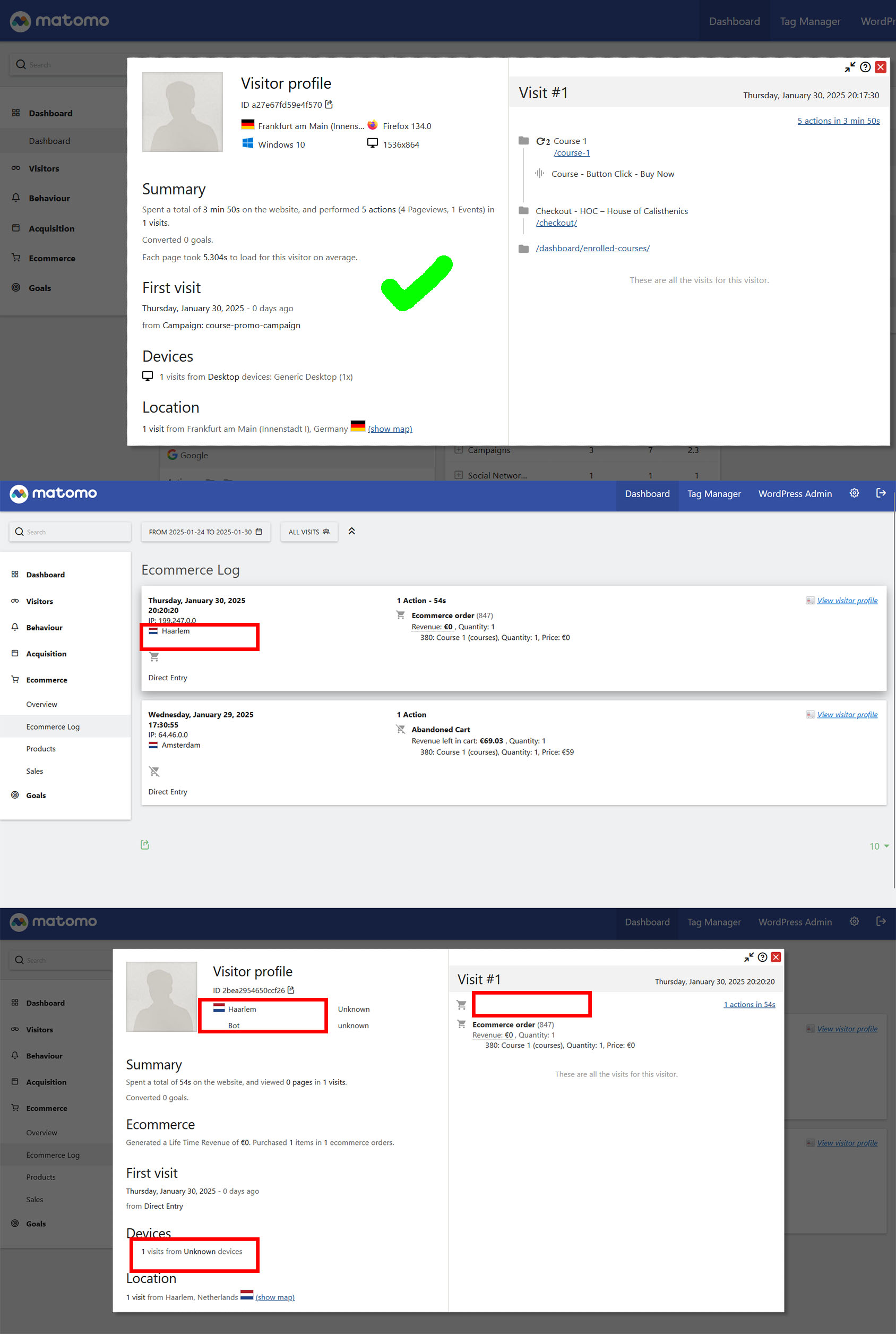
Matomo doesnt show the correct visitor profile data in the Ecommerce log.
When I do a test purchase of a product I can see the correct visitor data of the visit in the Matomo → Visits Log (country, entry channel and actions on the page).
However, when I go to the Ecommerce Log to look at the visitor profile of the sale, which should show the same data, the country of the visitor, for some reasons, is always shown as Netherlands (although, as you can see on the Visitor Log it’s supposed to be Germany in this case) and entry channel and page actions are missing entirely. (I also noticed that the “ecommerce purchase” action in the visitor log is missing which I think should be displayed there no?)
This looks to me that somewhere there in Ecommerce Log, the IP passed is Netherlands instead of client IP.
In other words, the IP u are seeing looks to be server IP or CDN IP instead of actual client IP (the actual user).
This is 99% of time an issue with passing origin IP for the visitor; if you are using a CDN then there are tweaks u need to make at server level to pass on the visitor’s IP (independent to Matomo).
I haven’t seen the Ecommerce Log diff IP myself, but have seen strange visitor IPs that were the server IP.
Look into passing origin IP at server level.
But this is super strange that u see it in one part of Matomo and not the other one; wondering maybe your Ecom log is with Tag Manager and that does not pass it – maybe that’s another one, whereas normal Visitor IP is passed.
So I found out that what caused this behaviour is the Matomo option “disable cookies”. If I disable this option (and allow tracking through cookies) it works well.
However, I’m trying to run Matomo GDPR friendly so I would actually like to keep cookies deactivated. I reviewed Matomo’s mysql tables and found out, that when cookies are allowed, the visitor ID in wp_matomo_log_visit (idvisit) is the same as the visitor ID in wp_matomo_log_conversion. So the two entries are connected. On the other hand if activate cookieless tracking the entry in the visitor log and the entry in the conversion log have a different idvisit and therefore aren’t associated.
I assume this is a bug in Matomo and hope it can be fixed or a workaround can be created. Thank you!
Hey, I’ve actually seen this kind of mismatch in Matomo before, it’s a bit confusing at first honestly.
What you’re describing makes sense — Visitor Log showing correct session data, but Ecommerce Log pulling weird or incomplete info (like wrong country + missing actions). I faced something similar when I was tracking WooCommerce test orders, and it turned out not to be “wrong data” but how Matomo links ecommerce events to visits.
What worked for me:
Make sure tracking is firing before the purchase event (timing issues can break session mapping)
Check if server-side caching or GDPR plugins are stripping referrer/channel info
Test with a clean browser session (no plugins) to rule out WooCommerce + Matomo plugin conflicts
Also noticed sometimes “purchase” event doesn’t fully attach to visit if JS tracking fires late.
In my case while working with setups under U-Shop, this kind of issue came mostly from event timing, not data loss.
Have you checked if the purchase event is firing on thank-you page instantly or delayed?