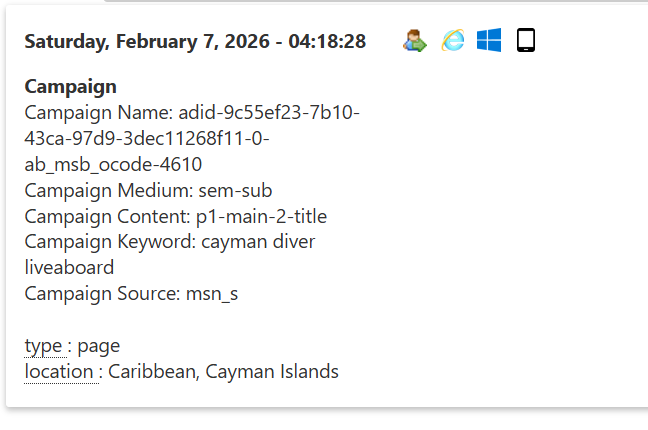
Hello community!
I’m a complete noob and happy to be here  I’m sure my question has a simple answer.
We have Matomo for WordPress, the plugin, running on (sorry, not allowed to include links) https [dot double slash] asb-hilft.jetzt. I’m trying to teach myself how to run and track campaigns.
Using the URL builder, I made this link: https [dot double slash] asb-hilft.jetzt [slash] fuer/region-stuttgart/?mtm_campaign=testcampaign&mtm_kwd=keywordtest. Yesterday and today, I put numerous clicks on that URL and I also asked 4 colleagues to do the same. Fast forward to almost one day later and I still get this in Acquisition > Campaigns:
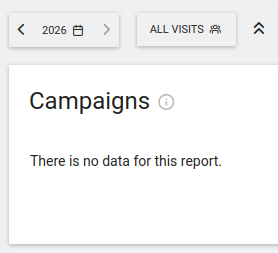
From all the documentation I’ve read (and all the AI I’ve asked ;-)), I got the impression that this is as easy as: click on campaign link > campaign gets tracked.
What am I missing?
Additional information
- Privacy settings are all pretty lax, 1 byte IP masking, all the other stuff is unselected (e.g. we’re using cookies, not replacing IDs with pseudonyms…).
- We’re using Real Cookie Banner on this website, which I’m unfamiliar with. It was installed by a business partner of my boss for Google Ads compatibility. So it might be some setting there?
- For all I can tell, Matomo’s tracking code is properly implemented. I mean, it does track other visits, though I don’t know how accurate any of that information is now.
- What’s the best way to check if the tracking code is properly implemented across the entire website?
- On the Troubleshooting page, I cleared the cache and regenerated the tracking code.
System Report
			  # Matomo

Matomo Plugin Version: 5.6.1

Config exists and is writable.: Yes (“$abs_path/wp-content/uploads/matomo/config/config.ini.php” )

JS Tracker exists and is writable.: Yes (“$abs_path/wp-content/uploads/matomo/matomo.js” )

Plugin directories: Yes ([{“pluginsPathAbsolute”:“$abs_path/wp-content/plugins/matomo/plugins”,“webrootDirRelativeToMatomo”:“../plugins”},{“pluginsPathAbsolute”:“$abs_path/wp-content/plugins”,“webrootDirRelativeToMatomo”:“../../”}])

Tmp directory writable: Yes ($abs_path/wp-content/cache/matomo)

Matomo Version: 5.6.2

Matomo Blog idSite: 1

Matomo Install Version: 5.6.1 (Install date: 2026-02-03 11:21:31)

Upgrades outstanding: No

Upgrade in progress: No

Current Matomo User Language: en

Current Matomo Language Cookie Value: None

Endpoints

Matomo JavaScript Tracker URL:  ($site_url/wp-content/uploads/matomo/matomo.js)

Matomo JavaScript Tracker - WP Rest API:  ($site_url/wp-json/matomo/v1/hit/)

Matomo HTTP Tracking API:  ($site_url/wp-content/plugins/matomo/app/matomo.php)

Matomo HTTP Tracking API - WP Rest API:  ($site_url/wp-json/matomo/v1/hit/)

Crons

Server time: 2026-02-06 11:54:47

Blog time: 2026-02-06 12:54:47 (Below dates are shown in blog timezone)

Sync users & sites: Next run: 2026-02-07 09:27:20 (20 hours 32 min) ( Last started: 2026-02-06 09:27:29 (-3 hours 27 min). Last ended: 2026-02-06 09:27:29 (-3 hours 27 min). Interval: daily)

Archive: Next run: 2026-02-06 13:26:29 (31 min 42s) ( Last started: 2026-02-06 12:29:23 (-25 min 24s). Last ended: 2026-02-06 12:29:25 (-25 min 22s). Interval: hourly)

Update GeoIP DB: Next run: 2026-02-21 09:27:20 (14 days 20 hours) ( Last started: 2026-01-22 09:30:48 (-15 days 3 hours). Last ended: 2026-01-22 09:30:50 (-15 days 3 hours). Interval: matomo_monthly)

Mandatory checks

PHP version >= 7.2.5: ok

PDO extension: ok

PDO\MYSQL extension: ok

MYSQLI extension: ok

Other required extensions: ok

Required functions: ok

Required PHP configuration (php.ini): ok

Directories with write access: ok

Directories with write access for Tag Manager: ok

Optional checks

64-bit PHP Binary: ok

Tracker status: ok

Memory limit: ok

Time zone: ok

Open URL: ok

GD > 2.x + FreeType (graphics): ok

Other extensions: ok

Other functions: ok

Filesystem: ok

Last Successful Archiving Completion: ok

Database abilities: ok

Warning Max Packet Size: warning  (It is recommended to configure a ‘max_allowed_packet’ size in your MySQL database of at least 64MB. Configured is currently 16MB. )

Geolocation: ok

Update over HTTPS: ok

Mobile Messaging SMS Provider: ok

Supports Async Archiving: No

Async Archiving Disabled in Setting: No

Location provider ID: geoip2php

Location provider available: Yes

Location provider working: Yes

Warning Proxy header: HTTP_X_REAL_IP (A proxy header is set which means you maybe need to configure a proxy header in the Advanced settings to make location reporting work. If the location in your reports is detected correctly, you can ignore this warning. Learn more)

Had visit in last 5 days: Yes

Matomo URL: Yes ($site_url/wp-content/plugins/matomo/app/)

Matomo Settings

Track mode: default

Track ecommerce: Yes

Track codeposition: footer

Track api endpoint: default

Track js endpoint: default

Version history: 5.6.1, 5.6.0, 5.3.3

Core version: 5.6.2

Last tracking settings update: 1761294442

Last settings update: 1761294442

Logs

None:

WordPress

Home URL: $site_url

Site URL: $site_url

WordPress Version: 6.9

Number of blogs: 1

Multisite Enabled: No

Network Enabled: No

WP_DEBUG: No

WP_DEBUG_DISPLAY: Yes

WP_DEBUG_LOG: No

DISABLE_WP_CRON: -

FORCE_SSL_ADMIN: Yes

WP_CACHE: Yes

CONCATENATE_SCRIPTS: -

COMPRESS_SCRIPTS: -

COMPRESS_CSS: -

ENFORCE_GZIP: -

WP_LOCAL_DEV: -

WP_CONTENT_URL: $site_url/wp-content

WP_CONTENT_DIR: $abs_path/wp-content

UPLOADS: -

BLOGUPLOADDIR: -

DIEONDBERROR: -

WPLANG: -

ALTERNATE_WP_CRON: -

WP_CRON_LOCK_TIMEOUT: 60

WP_DISABLE_FATAL_ERROR_HANDLER: -

MATOMO_SUPPORT_ASYNC_ARCHIVING: -

MATOMO_ENABLE_TAG_MANAGER: -

MATOMO_SUPPRESS_DB_ERRORS: -

MATOMO_ENABLE_AUTO_UPGRADE: -

MATOMO_DEBUG: -

MATOMO_SAFE_MODE: -

MATOMO_GLOBAL_UPLOAD_DIR: -

MATOMO_LOGIN_REDIRECT: -

Permalink Structure: /%category%/%postname%/

Possibly uses symlink: No

Upload base url: $site_url/wp-content/uploads

Upload base dir: $abs_path/wp-content/uploads

Upload url: $site_url/wp-content/uploads/2026/02

Custom upload_path:

Custom upload_url_path:

Compatible content directory: Yes

WP_Filesystem Initialized: Yes

Warning System Cron Set Up: No (Warning: Your WordPress site does not appear to have a system cron job set up to run the WordPress cron. Matomo uses the WordPress cron to generate reports and to delete temporary data to provide compliance with various privacy regulations (e.g., GDPR).  Without a system cron job set up, these tasks may be run irregularly or infrequently, which could lead to personal data being retained longer than allowed.  To avoid this, we recommend setting up a system cron job to run the WordPress cron regularly. Contact your hosting provider if you require help with this.)

Current User Locale: en_US

WordPress Plugins

Admin and Site Enhancements (ASE): 8.3.1

Advanced Themer for Bricks: 3.3.11

All-In-One Security (AIOS): 5.4.6 (Network enabled)

Bricksforge: 3.1.7.1

Custom Reports (Matomo Plugin): 5.4.9

FluentSMTP: 2.2.95

HappyFiles Pro: 1.8.3

MA Custom Fonts: 3.3.1

MainWP Child: 5.4.1

Matomo Analytics - Ethical Stats. Powerful Insights.: 5.6.1

Pods - Custom Content Types and Fields: 3.3.4

Rank Math SEO: 1.0.263

Real Cookie Banner: 5.2.14

WP-Optimize - Clean, Compress, Cache: 4.4.1

WP Armour - Honeypot Anti Spam: 2.3.04

WP Armour Extended - Honeypot Anti Spam: 1.40

WPCodeBox 2: 1.3.1

WPvivid Backup Plugin: 0.9.124

WPvivid Plugins Pro: 2.2.41

WPvivid Staging: 2.0.22

Active Plugins: 20 (wpcodebox2:1.3.1 fluent-smtp:2.2.95 CustomReports:5.4.9 admin-site-enhancements:8.3.1 all-in-one-wp-security-and-firewall:5.4.6 bricks-advanced-themer:3.3.11 bricksforge:3.1.7.1 happyfiles-pro:1.8.3 honeypot:2.3.04 ma-custom-fonts.php:3.3.1 mainwp-child:5.4.1 matomo:5.6.1 pods:3.3.4 real-cookie-banner-pro:5.2.14 seo-by-rank-math:1.0.263 wp-armour-extended:1.40 wp-optimize:4.4.1 wpvivid-backup-pro:2.2.41 wpvivid-backuprestore:0.9.124 wpvivid-staging:2.0.22)

Theme: bricks (bricks-child)

Server

Server Info: Apache

Apache AddHandler support: Supported

PHP OS: Linux

PHP Version: 8.4.15

PHP SAPI: cgi-fcgi

PHP Binary Name: /usr/local/php84/bin/php-cgi

PHP Maxmind DB extension: Not loaded

PHP Error Reporting: 4437 After bootstrap: 4437

PHP Found Binary: /usr/bin/php -q

Timezone: UTC

WP timezone: Europe/Berlin

Locale: de_DE_formal

User Locale: en_US

Memory Limit: 1024M (At least 128MB recommended. Depending on your traffic 256MB or more may be needed.)

WP Memory Limit: 40M

WP Max Memory Limit: 1024M

Timezone version: 2025.2

Time: 1770378888

Max Execution Time: 180

Max Post Size: 256M

Max Upload Size: 268435456

Max Input Vars: 4000

Disabled PHP functions: Yes (pcntl_alarm,pcntl_fork,pcntl_waitpid,pcntl_wait,pcntl_wifexited,pcntl_wifstopped,pcntl_wifsignaled,pcntl_wifcontinued,pcntl_wexitstatus,pcntl_wtermsig,pcntl_wstopsig,pcntl_signal,pcntl_signal_get_handler,pcntl_signal_dispatch,pcntl_get_last_error,pcntl_strerror,pcntl_sigprocmask,pcntl_sigwaitinfo,pcntl_sigtimedwait,pcntl_exec,pcntl_getpriority,pcntl_setpriority,pcntl_async_signals,pcntl_unshare,)

zlib.output_compression is off: Yes

Curl Version: 7.74.0, OpenSSL/1.1.1w

Suhosin installed: No

PHP cli

PHP CLI Version: 7.4.33 (The detected PHP CLI version does not match the PHP web version. To avoid archiving errors, enable archiving via HTTP requests, or manually set the path to your PHP CLI executable to the one for PHP version 8.4.15.)

MySQLi support: ok

Database

MySQL Version: 8.0.44

Mysqli Connect: Yes

Force MySQL over Mysqli: No

DB Prefix: chcnclSh8_

DB CHARSET: utf8

DB COLLATE:

SHOW ERRORS: No

SUPPRESS ERRORS: No

Uses Socket: No

Uses IPv6: No

Matomo tables found: 113

DB tables exist: Yes

Matomo users found: 4

Matomo sites found: 1

Required permissions: OK

Browser

Browser:  (Mozilla/5.0 (X11; Linux x86_64; rv:140.0) Gecko/20100101 Firefox/140.0)

Language: en-gb,en
Any ideas will be greatly appreciated.