I installed Matomo (self hosted version) on my website for tracking purposes. I have quite a bit of experience with this; I’ve probably installed 30–40 Matomo systems by now. Problem: No data is showing up under “Campaigns.” I created several campaign URLs using the Matomo tool, and they are receiving visitors, but they aren’t showing up in the statistics. Everything else is working fine. Any data policy settings problems? I checked a lot of settings and everything is looking fine to me. I’m at a loss. Any ideas?
Any ideas?  More details needed?
Do you see the campaign data in the visits log and not the reports or does the campaign data not appear anywhere?
Hi Jason,
I can see the visit in the log, but here, also without the param. It shows only the visit and the URL of the page.
I also checked, if the tracking param will be redirected by the website. this is not the case.
Hi Jan,
Just to confirm, you have the plugin installed for campaigns? Marketing Campaigns Reporting - Matomo Plugins Marketplace
Hi Jason,
yes, its installed and everything is on newest version
Quick next move @janh1 open DevTools → Network → filter for matomo.php , hit a campaign URL, and look at the url= parameter on that request. If url= is already missing the campaign param, the tracker never saw it, which matches what you’re seeing in the visit log. If url= does contain it, then it’s a Matomo-side issue (archiving, plugin config.
Assuming it’s missing from url= , the usual culprits:
-
The tracker is setting a custom URL that drops the query string, common on React/Next/Vue sites where someone wrote
_paq.push(['setCustomUrl', window.location.pathname])instead ofwindow.location.href. SPA route changes can also firetrackPageViewbefore the campaign param is preserved. -
A CDN in front of the site (Cloudflare especially) stripping query params for caching “Cache Everything” rules will drop
pk_campaign/utm_*unless they’re whitelisted in the cache key. -
An Apache/Nginx rewrite that returns 200 (not 301/302) silently dropping the query a redirect check won’t catch that since the browser URL doesn’t change.
-
A consent/CMP script (Cookiebot, OneTrust, Borlabs) firing the tracker after the URL has been “cleaned”, or rewriting the URL before the tracker reads it.
If you don’t mind sharing the link to the website I could have a quick look.
Hi Raphael,
thank you! You are right, the tracking param is missing from the url=
But we don’t have Apache/NGINX redirect, no CloudFlare (or other CDN), no Consent/CMP and the website is just WordPress, no React/Vue
URL: embolableadership_org / self-limiting-beliefs/?mtm_campaign=belief_carousel_linkedin
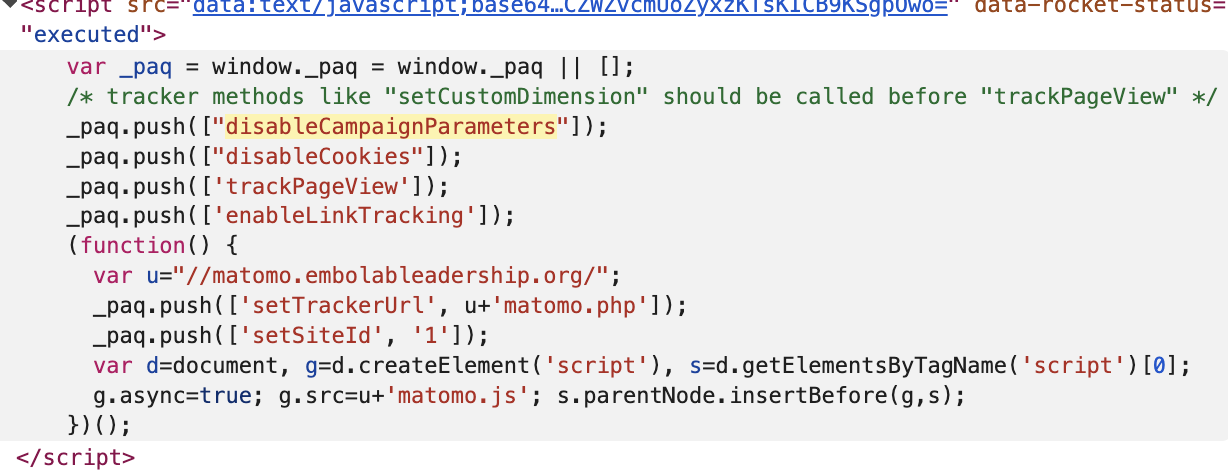
OMG! Many thanks! This is surely the problem. Will test it now. Thank you!
Update: its working
Awesome! Glad it worked.