Matomo for WordPress - System Warnings on WordPress Multisite

I have installed Matomo for WordPress on my WordPress Multisite installation. After the installation, I noticed the following system warning:

“There are some issues with your system. Matomo will run, but you might experience some minor problems. See below for more information.”

There are several sections highlighted in yellow, which I assume are warnings that may require attention.

1. Proxy Header Warnings

I am seeing these two warnings:

Proxy header - HTTP_X_FORWARDED_FOR

A proxy header is set which means you maybe need to configure a proxy header in the Advanced settings to make location reporting work. If the location in your reports is detected correctly, you can ignore this warning.

Proxy header - HTTP_CF_CONNECTING_IP

A proxy header is set which means you maybe need to configure a proxy header in the Advanced settings to make location reporting work. If the location in your reports is detected correctly, you can ignore this warning.

2. System Cron Set Up - No

I also noticed the following warning:

System Cron Set Up - No

Warning: Your WordPress site does not appear to have a system cron job set up to run the WordPress cron. Matomo uses the WordPress cron to generate reports and to delete temporary data to provide compliance with various privacy regulations (e.g., GDPR).

Without a system cron job set up, these tasks may be run irregularly or infrequently, which could lead to personal data being retained longer than allowed.

To avoid this, we recommend setting up a system cron job to run the WordPress cron regularly. Contact your hosting provider if you require help with this.

My Environment

My current setup is:

  • WordPress Multisite / Multiuser
  • Matomo for WordPress installed as a plugin
  • Main domain and most subsites/domains are behind Cloudflare
  • Multiple domains/subsites are running within the same WordPress Multisite network
  • Directadmin Control Panel with Litespeed webserver

I would like to make sure that Matomo is configured correctly and that these warnings are addressed properly rather than simply ignored.

Questions

For the proxy header warnings:

  1. Should I configure a proxy header in Matomo when using Cloudflare with WordPress Multisite?
  2. If so, should I use REMOTE_ADDR, HTTP_CF_CONNECTING_IP, HTTP_X_FORWARDED_FOR or another configuration?
  3. Since most of domains/subsites are behind Cloudflare, is there a recommended configuration to ensure that the correct visitor IP and geolocation are reported?

For the System Cron warning:

  1. For a WordPress Multisite installation, should the system cron run wp-cron.php once for the entire network, or is additional configuration required for individual subsites?
  2. Is there a recommended cron command or configuration specifically for Matomo for WordPress Multisite?

I would appreciate any guidance on the recommended configuration for Matomo for WordPress + WordPress Multisite + Cloudflare, particularly to ensure that:

  • Visitor IP addresses and geolocation are detected correctly
  • Matomo scheduled reports run reliably
  • Temporary data is cleaned up as expected
  • Privacy-related data deletion and retention tasks run properly
  • The setup follows Matomo’s recommended configuration

Thank you for any advice or recommendations.

For Cloudflare, I’d configure Matomo to use HTTP_CF_CONNECTING_IP for the real visitor IP, then verify the detected IP in Matomo reports. For the cron warning, set up a regular server-side cron to trigger WordPress’s wp-cron.php; that’s more reliable than depending on visitor traffic, including on multisite.

Thank you for taking the time to answer my question. I’m using DirectAdmin, which allows me to set up cron jobs.

How frequently would you recommend running the cron job, and what command should I use to trigger WordPress cron?

Cloudflare ke saath HTTP_CF_CONNECTING_IP use karna generally best choice hai, provided server/LiteSpeed is header ko correctly trust karta ho. Agar Matomo already correct IP/location show kar raha hai, proxy warning ignore kar sakte hain.

Cron ke liye Multisite par normally ek system cron enough hota hai jo wp-cron.php regularly run kare (e.g. every 5 minutes). Har subsite ke liye separate cron ki zarurat nahi hoti.

I’d also appreciate everyone’s feedback and suggestions on how I can further optimize the setup and identify any potential errors or issues that I may have overlooked.

I’ve already registered with MaxMind, obtained the API key, and added it to the configuration. However, I noticed that there seems to be an error preventing MaxMind GeoIP from loading properly.

I would really appreciate any advice, suggestions or guidance from those with more experience, especially since I’m still new to using Matomo for WordPress. Any feedback would be greatly appreciated.

					# Matomo

* Matomo Plugin Version: 5.12.1
* Config exists and is writable.: Yes ("$abs_path/wp-content/uploads/matomo/config/config.ini.php" )
* JS Tracker exists and is writable.: Yes ("$abs_path/wp-content/uploads/matomo/matomo.js" )
* Plugin directories: Yes ([{"pluginsPathAbsolute":"$abs_path\/wp-content\/plugins\/matomo\/plugins","webrootDirRelativeToMatomo":"..\/plugins"}])
* Tmp directory writable: Yes ($abs_path/wp-content/uploads/matomo/tmp)
* Matomo Version: 5.12.0
* Matomo Blog idSite: 1
* Matomo Install Version: 5.12.1 (Install date: 2026-08-09 14:04:14)
* Upgrades outstanding: No
* Upgrade in progress: No
* Current Matomo User Language: en
* Current Matomo Language Cookie Value: None

## Endpoints

* Matomo JavaScript Tracker URL:  ($site_url/wp-content/uploads/matomo/matomo.js)
* Matomo JavaScript Tracker - WP Rest API:  ($site_url/wp-json/matomo/v1/hit/)
* Matomo HTTP Tracking API:  ($site_url/wp-content/plugins/matomo/app/matomo.php)
* Matomo HTTP Tracking API - WP Rest API:  ($site_url/wp-json/matomo/v1/hit/)

## Crons

* Server time: 2026-08-17 13:53:17
* Blog time: 2026-08-17 13:53:17 (Below dates are shown in blog timezone)
* Sync users & sites: Next run: 2026-08-17 14:05:10 (11 min 53s) ( Last started: 2026-08-17 13:38:32 (-14 min 45s). Last ended: 2026-08-17 13:38:32 (-14 min 45s). Interval: daily)
* Archive: Next run: 2026-08-17 14:04:26 (11 min 9s) ( Last started: 2026-08-17 13:04:46 (-48 min 31s). Last ended: 2026-08-17 13:04:48 (-48 min 29s). Interval: hourly)
* Update GeoIP DB: Next run: 2026-08-18 12:01:31 (22 hours 8 min) ( Last started: 2026-08-17 13:36:14 (-17 min 3s). Last ended: 2026-08-17 13:36:16 (-17 min 1s). Interval: matomo_monthly)

## Mandatory checks

* PHP version >= 7.2.5: ok 
* PDO extension: ok 
* PDO\MYSQL extension: ok 
* MYSQLI extension: ok 
* Other required extensions: ok 
* Required functions: ok 
* Required PHP configuration (php.ini): ok 
* Directories with write access: ok 

## Optional checks

* 64-bit PHP Binary: ok 
* Tracker status: ok 
* Memory limit: ok 
* Time zone: ok 
* Open URL: ok 
* GD > 2.x + FreeType (graphics): ok 
* Other extensions: ok 
* Other functions: ok 
* Filesystem: ok 
* Last Successful Archiving Completion: ok 
* Database abilities: ok 
* Max Packet Size: ok 
* Geolocation: ok 
* Update over HTTPS: ok 
* Mobile Messaging SMS Provider: ok 
* Supports Async Archiving: No
* Async Archiving Disabled in Setting: No
* Location provider ID: geoip2php
* Location provider available: Yes
* Location provider working: Yes
* Had visit in last 5 days: Yes
* Matomo URL: Yes ($site_url/wp-content/plugins/matomo/app/)

## Matomo Settings

* Track mode: default
* Track ecommerce: Yes
* Track codeposition: footer
* Track api endpoint: default
* Track js endpoint: default
* Version history: 5.12.1
* Core version: 5.12.0
* Last settings update: 1786974780
* Last tracking settings update: 1786973625
* Track noscript: Yes
* Track content: all
* Track search: Yes
* Track 404: Yes
* Track ai bots: Yes
* Track ai bots using esi: Yes
* Track across: Yes
* Track crossdomain linking: Yes
* Track feed: Yes
* Track feed addcampaign: Yes
* Track user id: username
* Track jserrors: Yes
* Delete all data uninstall: No
* Show get started page: 0

## Logs

* update_geoip2: 2026-08-16 07:11:37 (GeoIP2AutoUpdater: failed to unzip '$abs_path/wp-content/uploads/matomo/tmp/latest/GeoIP2-City.mmdb.tar.gz.download' after downloading 'https://download.maxmind.com/app/geoip_download?edition_id=GeoLite2-City&suffix=tar.gz&license_key=asdsdojb_mmasdsa': Couldn't list content for '$abs_path/wp-content/uploads/matomo/tmp/latest/GeoIP2-City.mmdb.tar.gz.download': Invalid block size : 20 => GeoIP2AutoUpdater.php:150; GeoIP2AutoUpdater.php:86; ScheduledTasks.php:286; class-wp-hook.php:339; class-wp-hook.php:365; plugin.php:570; wp-cron.php:191;)
* update_geoip2: 2026-08-17 12:01:31 (GeoIP2AutoUpdater: failed to unzip '$abs_path/wp-content/uploads/matomo/tmp/latest/GeoIP2-City.mmdb.tar.gz.download' after downloading 'https://download.maxmind.com/app/geoip_download?edition_id=GeoLite2-City&suffix=tar.gz&license_key=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': The downloaded file is not a valid geolocation database. Please re-check the URL or download the file manually. => GeoIP2AutoUpdater.php:150; GeoIP2AutoUpdater.php:86; ScheduledTasks.php:286; SystemReport.php:192; SystemReport.php:352; MatomoPage.php:41; class-wp-hook.php:341; class-wp-hook.php:365; plugin.php:522; admin.php:264;)

# WordPress

* Home URL: $site_url
* Site URL: $site_url
* WordPress Version: 7.0.4
* Number of blogs: 13
* Multisite Enabled: Yes
* Network Enabled: Yes
* WP_DEBUG: No
* WP_DEBUG_DISPLAY: Yes
* WP_DEBUG_LOG: No
* DISABLE_WP_CRON: -
* FORCE_SSL_ADMIN: Yes
* WP_CACHE: Yes
* CONCATENATE_SCRIPTS: -
* COMPRESS_SCRIPTS: -
* COMPRESS_CSS: -
* ENFORCE_GZIP: -
* WP_LOCAL_DEV: -
* WP_CONTENT_URL: $site_url/wp-content
* WP_CONTENT_DIR: $abs_path/wp-content
* UPLOADS: -
* BLOGUPLOADDIR: -
* DIEONDBERROR: -
* WPLANG: -
* ALTERNATE_WP_CRON: -
* WP_CRON_LOCK_TIMEOUT: 60
* WP_DISABLE_FATAL_ERROR_HANDLER: -
* MATOMO_SUPPORT_ASYNC_ARCHIVING: -
* MATOMO_ENABLE_TAG_MANAGER: -
* MATOMO_SUPPRESS_DB_ERRORS: -
* MATOMO_ENABLE_AUTO_UPGRADE: -
* MATOMO_DEBUG: -
* MATOMO_SAFE_MODE: -
* MATOMO_GLOBAL_UPLOAD_DIR: -
* MATOMO_LOGIN_REDIRECT: -
* Permalink Structure: /%postname%/
* Possibly uses symlink: No
* Upload base url: $site_url/wp-content/uploads
* Upload base dir: $abs_path/wp-content/uploads
* Upload url: $site_url/wp-content/uploads/2026/08
* Custom upload_path: 
* Custom upload_url_path: 
* Compatible content directory: Yes
* WP_Filesystem Initialized: Yes
* Warning System Cron Set Up: No (Warning: Your WordPress site does not appear to have a system cron job set up to run the WordPress cron. Matomo uses the WordPress cron to generate reports and to delete temporary data to provide compliance with various privacy regulations (e.g., GDPR).  Without a system cron job set up, these tasks may be run irregularly or infrequently, which could lead to personal data being retained longer than allowed.  To avoid this, we recommend setting up a system cron job to run the WordPress cron regularly. Contact your hosting provider if you require help with this.)
* Current User Locale: en_US

# WordPress Plugins

* Akismet Anti-spam: Spam Protection: 5.7
* Contact Form 7: 6.1.7
* Flamingo: 2.6.3
* hCaptcha for WP: 5.2.0
* IndexNow: 1.0.4
* JetBackup: 3.1.23.3
* LiteSpeed Cache: 7.9
* Matomo Analytics - Ethical Stats. Powerful Insights.: 5.12.1
* Matomo Marketplace for WordPress: 1.2.1
* Slim SEO: 4.9.11
* SureCookie: 1.3.1
* WordPress Importer: 0.9.5
* Active Plugins: 6 (backup:3.1.23.3 contact-form-7:6.1.7 flamingo:2.6.3 hcaptcha-for-forms-and-more:5.2.0 indexnow:1.0.4 slim-seo:4.9.11 surecookie:1.3.1)
* Theme: the-box (the-box)

# Server

* Server Info: LiteSpeed
* PHP OS: Linux
* PHP Version: 8.5.6
* PHP SAPI: litespeed
* PHP Binary Name: /opt/alt/php85/usr/bin/lsphp
* PHP Maxmind DB extension: Not loaded
* PHP Error Reporting: 4437 After bootstrap: 4437
* Timezone: UTC
* WP timezone: +00:00
* Locale: en_US
* User Locale: en_US
* Memory Limit: 512M (At least 128MB recommended. Depending on your traffic 256MB or more may be needed.)
* WP Memory Limit: 64M
* WP Max Memory Limit: 512M
* Timezone version: 2026.1
* Time: 1786974798
* Max Execution Time: 300
* Max Post Size: 128M
* Max Upload Size: 1536000
* Max Input Vars: 3000
* Disabled PHP functions: No
* zlib.output_compression is off: Yes
* Curl Version: 8.19.0, OpenSSL/3.5.5
* Suhosin installed: No

# PHP cli

* PHP CLI Version:  (The detected PHP CLI version does not match the PHP web version. To avoid archiving errors, <a href="$site_url/wp-admin/admin.php?page=matomo-settings&tab=advanced#matomo[disable_async_archiving]">enable archiving via HTTP requests</a>, or <a href="https://matomo.org/faq/how-to-solve-the-error-message-your-php-cli-version-is-not-compatible-with-the-matomo-requirements/" target="_blank" rel="noreferrer noopener">manually set the path to your PHP CLI executable</a> to the one for PHP version 8.5.6.)
* MySQLi support: missing (Your PHP cli does not load the MySQLi extension. You might have archiving problems in Matomo but also others problems in your WordPress cron tasks. You should enable this extension)

# Database

* MySQL Version: 8.4.11
* Mysqli Connect: Yes
* Force MySQL over Mysqli: No
* DB Prefix: wpbn_
* DB CHARSET: utf8mb4
* DB COLLATE: 
* SHOW ERRORS: No
* SUPPRESS ERRORS: No
* Uses Socket: No
* Uses IPv6: No
* Matomo tables found: 40
* DB tables exist: Yes
* Matomo users found: 1
* Matomo sites found: 1
* Required permissions: OK

# Browser

* Browser:  (Mozilla/5.0 (Windows NT 10.0; Win64; x64) AppleWebKit/537.36 (KHTML, like Gecko) Chrome/151.0.0.0 Safari/537.36)
* Language: en-us,en

Thank you very much for helping. You guys are awesome!

Hi, I’ve already set up the cron job for Matomo in DirectAdmin. However, when I checked the Matomo Diagnostics again, I noticed that the “System Cron Set Up” warning is still showing.

At the top, there’s also still a notification saying: “There are some issues with your system. Matomo will run, but you might experience some minor problems. See below for more information.”

The update_geoip2 is also showing an error, as you can see in the System Report I posted in my previous post, even though I’ve already added the MaxMind API key.

I would really appreciate it if anyone could help me troubleshoot and resolve these issues. Thank you in advance.

The main issue looks like the MaxMind download itself, not Matomo. GeoIP2 is available and working, but the downloaded .tar.gz is invalid. Verify the license key and try a manual download from the server, while checking LiteSpeed/firewall/security rules for interference. Also fix the missing PHP CLI/MySQLi and system cron, as those can cause other Matomo problems.

Hello,

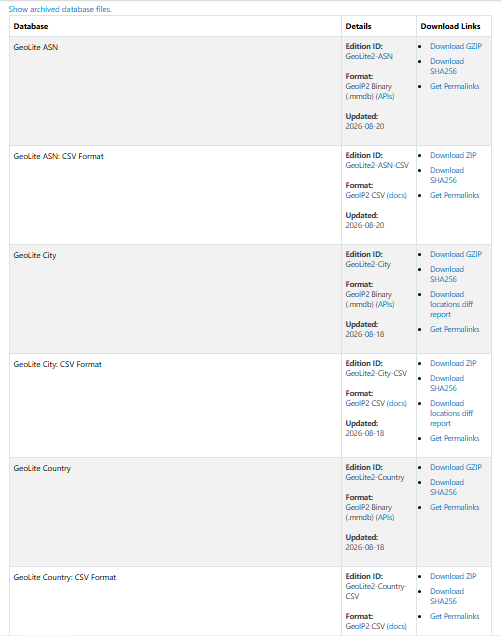
I have downloaded the MaxMind GeoIP files, extracted them, and uploaded the following files (not folders) directly into:

wp-content/plugins/matomo/

The files are:

  • GeoLite2-ASN.mmdb
  • GeoLite2-Country.mmdb
  • GeoLite2-City.mmdb

I have also made sure that the MaxMind License Key has been entered correctly. I am using the free MaxMind GeoLite2 database.

Matomo Cron Error: An error occurred while updating the geolocation database. See error details in the Diagnostics page.

Regarding PHP CLI and MySQLi, I have reverted the settings back to their default configuration. Could you please provide me with step-by-step instructions on exactly which settings/extensions I need to enable, including the recommended configuration for my setup?

For caching, I am only using LiteSpeed Cache. I am not using any security plugins such as Wordfence.

For your reference, my server is running DirectAdmin Control Panel with PHP 8.5. My current PHP CLI version is:

PHP 8.5.6 (cli) (built: May 9 2026 00:00:00) (NTS)

Zend Engine v4.5.6
with the ionCube PHP Loader v15.5.0
with Zend OPcache v8.5.6

I have also included the latest Diagnostics System Report below, together with the relevant screenshots, for your reference.

Please review the diagnostics and screenshots and let me know if there are any additional PHP extensions, PHP CLI settings, MySQLi settings, permissions, or server configurations that I should enable or adjust.

					# Matomo

* Matomo Plugin Version: 5.12.1
* Config exists and is writable.: Yes ("$abs_path/wp-content/uploads/matomo/config/config.ini.php" )
* JS Tracker exists and is writable.: Yes ("$abs_path/wp-content/uploads/matomo/matomo.js" )
* Plugin directories: Yes ([{"pluginsPathAbsolute":"$abs_path\/wp-content\/plugins\/matomo\/plugins","webrootDirRelativeToMatomo":"..\/plugins"}])
* Tmp directory writable: Yes ($abs_path/wp-content/uploads/matomo/tmp)
* Matomo Version: 5.12.0
* Matomo Blog idSite: 1
* Matomo Install Version: 5.12.1 (Install date: 2026-08-09 14:04:14)
* Upgrades outstanding: No
* Upgrade in progress: No
* Current Matomo User Language: en
* Current Matomo Language Cookie Value: None

## Endpoints

* Matomo JavaScript Tracker URL:  ($site_url/wp-content/uploads/matomo/matomo.js)
* Matomo JavaScript Tracker - WP Rest API:  ($site_url/wp-json/matomo/v1/hit/)
* Matomo HTTP Tracking API:  ($site_url/wp-content/plugins/matomo/app/matomo.php)
* Matomo HTTP Tracking API - WP Rest API:  ($site_url/wp-json/matomo/v1/hit/)

## Crons

* Server time: 2026-08-21 09:45:43
* Blog time: 2026-08-21 09:45:43 (Below dates are shown in blog timezone)
* Sync users & sites: Next run: 2026-08-21 14:05:10 (4 hours 19 min) ( Last started: 2026-08-21 08:53:39 (-52 min 4s). Last ended: 2026-08-21 08:53:42 (-52 min 1s). Interval: daily)
* Archive: Next run: 2026-08-21 10:04:26 (18 min 43s) ( Last started: 2026-08-21 09:04:32 (-41 min 11s). Last ended: 2026-08-21 09:04:33 (-41 min 10s). Interval: hourly)
* Update GeoIP DB: Next run: 2026-08-22 09:00:15 (23 hours 14 min) ( Last started: 2026-08-21 09:00:13 (-45 min 30s). Last ended: 2026-08-21 09:00:15 (-45 min 28s). Interval: matomo_monthly)

## Mandatory checks

* PHP version >= 7.2.5: ok 
* PDO extension: ok 
* PDO\MYSQL extension: ok 
* MYSQLI extension: ok 
* Other required extensions: ok 
* Required functions: ok 
* Required PHP configuration (php.ini): ok 
* Directories with write access: ok 

## Optional checks

* 64-bit PHP Binary: ok 
* Tracker status: ok 
* Memory limit: ok 
* Time zone: ok 
* Open URL: ok 
* GD > 2.x + FreeType (graphics): ok 
* Other extensions: ok 
* Other functions: ok 
* Filesystem: ok 
* Last Successful Archiving Completion: ok 
* Database abilities: ok 
* Max Packet Size: ok 
* Geolocation: ok 
* Update over HTTPS: ok 
* Mobile Messaging SMS Provider: ok 
* Supports Async Archiving: No
* Async Archiving Disabled in Setting: No
* Location provider ID: geoip2php
* Location provider available: Yes
* Location provider working: Yes
* Had visit in last 5 days: Yes
* Matomo URL: Yes ($site_url/wp-content/plugins/matomo/app/)

## Matomo Settings

* Track mode: default
* Track ecommerce: Yes
* Track codeposition: footer
* Track api endpoint: default
* Track js endpoint: default
* Version history: 5.12.1
* Core version: 5.12.0
* Last settings update: 1787305537
* Last tracking settings update: 1787250123
* Track noscript: Yes
* Track content: all
* Track search: Yes
* Track 404: Yes
* Track ai bots: Yes
* Track ai bots using esi: Yes
* Track across: Yes
* Track crossdomain linking: Yes
* Track feed: Yes
* Track feed addcampaign: Yes
* Track user id: username
* Track jserrors: Yes
* Delete all data uninstall: No
* Show get started page: 0

## Logs

* update_geoip2: 2026-08-16 07:11:37 (GeoIP2AutoUpdater: failed to unzip '$abs_path/wp-content/uploads/matomo/tmp/latest/GeoIP2-City.mmdb.tar.gz.download' after downloading 'https://download.maxmind.com/app/geoip_download?edition_id=GeoLite2-City&suffix=tar.gz&license_key=asdsdojb_mmasdsa': Couldn't list content for '$abs_path/wp-content/uploads/matomo/tmp/latest/GeoIP2-City.mmdb.tar.gz.download': Invalid block size : 20 => GeoIP2AutoUpdater.php:150; GeoIP2AutoUpdater.php:86; ScheduledTasks.php:286; class-wp-hook.php:339; class-wp-hook.php:365; plugin.php:570; wp-cron.php:191;)
* update_geoip2: 2026-08-17 12:01:31 (GeoIP2AutoUpdater: failed to unzip '$abs_path/wp-content/uploads/matomo/tmp/latest/GeoIP2-City.mmdb.tar.gz.download' after downloading 'https://download.maxmind.com/app/geoip_download?edition_id=GeoLite2-City&suffix=tar.gz&license_key=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': The downloaded file is not a valid geolocation database. Please re-check the URL or download the file manually. => GeoIP2AutoUpdater.php:150; GeoIP2AutoUpdater.php:86; ScheduledTasks.php:286; SystemReport.php:192; SystemReport.php:352; MatomoPage.php:41; class-wp-hook.php:341; class-wp-hook.php:365; plugin.php:522; admin.php:264;)
* update_geoip2: 2026-08-21 09:00:15 (GeoIP2AutoUpdater: failed to unzip '$abs_path/wp-content/uploads/matomo/tmp/latest/GeoIP2-City.mmdb.tar.gz.download' after downloading 'https://download.maxmind.com/app/geoip_download?edition_id=GeoLite2-City&suffix=tar.gz&license_key=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': Couldn't list content for '$abs_path/wp-content/uploads/matomo/tmp/latest/GeoIP2-City.mmdb.tar.gz.download': Invalid block size : 20 => GeoIP2AutoUpdater.php:150; GeoIP2AutoUpdater.php:86; ScheduledTasks.php:286; class-wp-hook.php:351; class-wp-hook.php:377; plugin.php:571; wp-cron.php:191;)

# WordPress

* Home URL: $site_url
* Site URL: $site_url
* WordPress Version: 7.1
* Number of blogs: 13
* Multisite Enabled: Yes
* Network Enabled: Yes
* WP_DEBUG: No
* WP_DEBUG_DISPLAY: Yes
* WP_DEBUG_LOG: No
* DISABLE_WP_CRON: -
* FORCE_SSL_ADMIN: Yes
* WP_CACHE: Yes
* CONCATENATE_SCRIPTS: -
* COMPRESS_SCRIPTS: -
* COMPRESS_CSS: -
* ENFORCE_GZIP: -
* WP_LOCAL_DEV: -
* WP_CONTENT_URL: $site_url/wp-content
* WP_CONTENT_DIR: $abs_path/wp-content
* UPLOADS: -
* BLOGUPLOADDIR: -
* DIEONDBERROR: -
* WPLANG: -
* ALTERNATE_WP_CRON: -
* WP_CRON_LOCK_TIMEOUT: 60
* WP_DISABLE_FATAL_ERROR_HANDLER: -
* MATOMO_SUPPORT_ASYNC_ARCHIVING: -
* MATOMO_ENABLE_TAG_MANAGER: -
* MATOMO_SUPPRESS_DB_ERRORS: -
* MATOMO_ENABLE_AUTO_UPGRADE: -
* MATOMO_DEBUG: -
* MATOMO_SAFE_MODE: -
* MATOMO_GLOBAL_UPLOAD_DIR: -
* MATOMO_LOGIN_REDIRECT: -
* Permalink Structure: /%postname%/
* Possibly uses symlink: No
* Upload base url: $site_url/wp-content/uploads
* Upload base dir: $abs_path/wp-content/uploads
* Upload url: $site_url/wp-content/uploads/2026/08
* Custom upload_path: 
* Custom upload_url_path: 
* Compatible content directory: Yes
* WP_Filesystem Initialized: Yes
* Warning System Cron Set Up: No (Warning: Your WordPress site does not appear to have a system cron job set up to run the WordPress cron. Matomo uses the WordPress cron to generate reports and to delete temporary data to provide compliance with various privacy regulations (e.g., GDPR).  Without a system cron job set up, these tasks may be run irregularly or infrequently, which could lead to personal data being retained longer than allowed.  To avoid this, we recommend setting up a system cron job to run the WordPress cron regularly. Contact your hosting provider if you require help with this.)
* Current User Locale: en_US

# WordPress Plugins

* Akismet Anti-spam: Spam Protection: 5.7.2
* Contact Form 7: 6.1.7
* Flamingo: 2.6.4
* hCaptcha for WP: 5.2.0
* IndexNow: 1.0.4
* JetBackup: 3.1.23.3
* LiteSpeed Cache: 7.9
* Matomo Analytics - Ethical Stats. Powerful Insights.: 5.12.1
* Matomo Marketplace for WordPress: 1.2.1
* Slim SEO: 4.9.11
* SureCookie: 1.3.1
* WordPress Automatic Plugin: 3.137.1
* WordPress Importer: 0.9.5
* Active Plugins: 7 (backup:3.1.23.3 contact-form-7:6.1.7 flamingo:2.6.4 hcaptcha-for-forms-and-more:5.2.0 indexnow:1.0.4 slim-seo:4.9.11 surecookie:1.3.1)
* Theme: the-box (the-box)

# Server

* Server Info: LiteSpeed
* PHP OS: Linux
* PHP Version: 8.5.6
* PHP SAPI: litespeed
* PHP Binary Name: /opt/alt/php85/usr/bin/lsphp
* PHP Maxmind DB extension: Not loaded
* PHP Error Reporting: 4437 After bootstrap: 4437
* Timezone: UTC
* WP timezone: +00:00
* Locale: en_US
* User Locale: en_US
* Memory Limit: 2G (At least 128MB recommended. Depending on your traffic 256MB or more may be needed.)
* WP Memory Limit: 64M
* WP Max Memory Limit: 2G
* Timezone version: 2026.1
* Time: 1787305543
* Max Execution Time: 300
* Max Post Size: 256M
* Max Upload Size: 1536000
* Max Input Vars: 4000
* Disabled PHP functions: No
* zlib.output_compression is off: Yes
* Curl Version: 8.19.0, OpenSSL/3.5.5
* Suhosin installed: No

# PHP cli

* PHP CLI Version:  (The detected PHP CLI version does not match the PHP web version. To avoid archiving errors, <a href="$site_url/wp-admin/admin.php?page=matomo-settings&tab=advanced#matomo[disable_async_archiving]">enable archiving via HTTP requests</a>, or <a href="https://matomo.org/faq/how-to-solve-the-error-message-your-php-cli-version-is-not-compatible-with-the-matomo-requirements/" target="_blank" rel="noreferrer noopener">manually set the path to your PHP CLI executable</a> to the one for PHP version 8.5.6.)
* MySQLi support: missing (Your PHP cli does not load the MySQLi extension. You might have archiving problems in Matomo but also others problems in your WordPress cron tasks. You should enable this extension)

# Database

* MySQL Version: 8.4.11
* Mysqli Connect: Yes
* Force MySQL over Mysqli: No
* DB Prefix: wpbn_
* DB CHARSET: utf8mb4
* DB COLLATE: 
* SHOW ERRORS: No
* SUPPRESS ERRORS: No
* Uses Socket: No
* Uses IPv6: No
* Matomo tables found: 40
* DB tables exist: Yes
* Matomo users found: 1
* Matomo sites found: 1
* Required permissions: OK

# Browser

* Browser:  (Mozilla/5.0 (Windows NT 10.0; Win64; x64) AppleWebKit/537.36 (KHTML, like Gecko) Chrome/151.0.0.0 Safari/537.36)
* Language: en-us,en


directadmin_cron

Also, could you please clarify what the GeoIP.conf file from MaxMind is used for and where exactly it should be placed within the WordPress installation directory?
The setup looks mostly correct. The main issue seems to be the GeoIP update error and the PHP CLI configuration.

Thanks for pointing that out. I do have SSH and DirectAdmin access to the server. Could you guide me on how I can fix the GeoIP update error and the PHP CLI configuration?

I’m ready to run the necessary commands via SSH and make any required changes in DirectAdmin. Just let me know what I need to check or change.

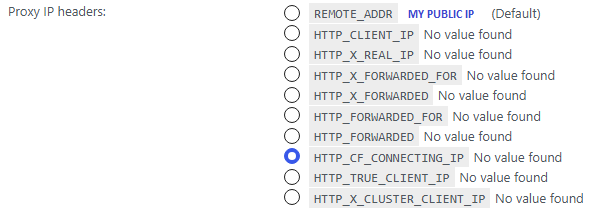
For the proxy headers, yes you need to set this up since Cloudflare sits in front of your site. Without it, Matomo just sees Cloudflare’s IP for every visitor instead of the real one, which breaks geolocation. Use HTTP_CF_CONNECTING_IP, not X_FORWARDED_FOR, since that’s the header Cloudflare specifically provides for the real client IP. You’ll find this setting under Administration > System > General Settings in Matomo, and you should also add Cloudflare’s IP ranges there as trusted proxies (they publish the list on their site) so Matomo only trusts that header when it’s actually coming from Cloudflare. Since you’re on Multisite, this is a network-wide setting, you only need to set it once, not per subsite.

For the cron issue, you still only need one system cron job for the whole network, not one per subsite. WordPress’s default cron only fires when someone visits the site, which is unreliable on low traffic subsites, and that’s exactly the risk the warning is pointing at for data cleanup. Add this to wp-config.php first:

define(‘DISABLE_WP_CRON’, true);

Then set up a real cron job through DirectAdmin, something like this running every 15 minutes:

wget -q -O /dev/null "

Just point it at your main domain, that’s enough for the whole network since Matomo’s scheduled tasks run from the main site.

If you want the most reliable setup, Matomo actually recommends running their own core:archive command directly via a CLI cron job if your host gives you SSH access, that skips relying on wp-cron entirely for report generation.

It looks like the warnings are mainly related to Cloudflare proxy headers and the WordPress cron setup. I’d check the proxy header configuration first, especially if visitor IPs or geolocation are not being reported correctly.

Thank you for the tip regarding define( 'DISABLE_WP_CRON', true );… I was indeed confused about whether this needs to be set if a system cron is already configured. After disabling WP Cron, the cron warning disappeared.

I’m also a bit confused regarding the proxy headers. The main site (the Network Admin site/root domain) does not use Cloudflare; only the subsite domains are behind Cloudflare. So, I’m a little unsure about the most appropriate configuration in this case. I’ve attached a screenshot for reference.

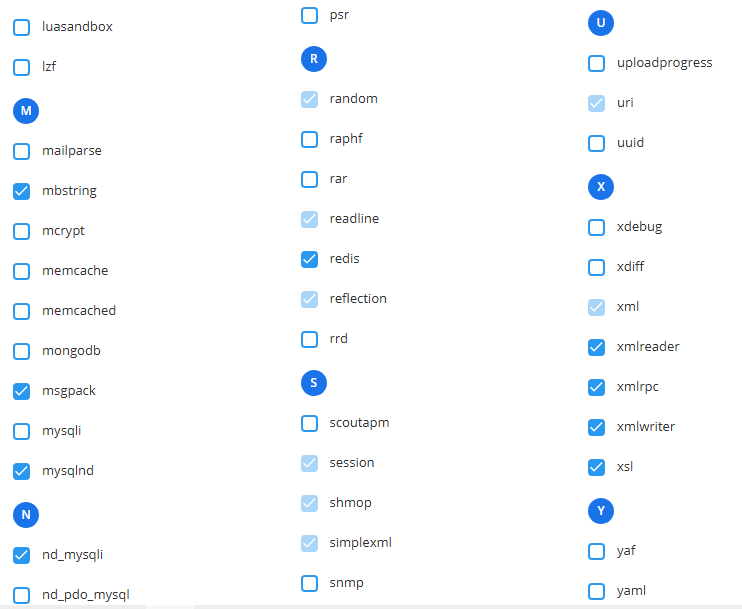
And this is another error that I’m not sure how to configure. In the PHP settings, I noticed that there are both nd_mysqli and non-nd mysqli options, and they conflict with each other, so I can’t enable both at the same time. I’d appreciate some advice on which one should be enabled.

The error shown is:

PHP CLI

PHP CLI Version: The detected PHP CLI version does not match the PHP web version. To avoid archiving errors, enable archiving via HTTP requests, or manually set the path to your PHP CLI executable to the one for PHP version 8.5.6.

MySQLi support: Missing
Your PHP CLI does not load the MySQLi extension. You might have archiving problems in Matomo, as well as other problems with your WordPress cron tasks. You should enable this extension.

Current diagnostics report:

					# Matomo

* Matomo Plugin Version: 5.12.1
* Config exists and is writable.: Yes ("$abs_path/wp-content/uploads/matomo/config/config.ini.php" )
* JS Tracker exists and is writable.: Yes ("$abs_path/wp-content/uploads/matomo/matomo.js" )
* Plugin directories: Yes ([{"pluginsPathAbsolute":"$abs_path\/wp-content\/plugins\/matomo\/plugins","webrootDirRelativeToMatomo":"..\/plugins"}])
* Tmp directory writable: Yes ($abs_path/wp-content/uploads/matomo/tmp)
* Matomo Version: 5.12.0
* Matomo Blog idSite: 1
* Matomo Install Version: 5.12.1 (Install date: 2026-08-09 14:04:14)
* Upgrades outstanding: No
* Upgrade in progress: No
* Current Matomo User Language: en
* Current Matomo Language Cookie Value: None

## Endpoints

* Matomo JavaScript Tracker URL:  ($site_url/wp-content/uploads/matomo/matomo.js)
* Matomo JavaScript Tracker - WP Rest API:  ($site_url/wp-json/matomo/v1/hit/)
* Matomo HTTP Tracking API:  ($site_url/wp-content/plugins/matomo/app/matomo.php)
* Matomo HTTP Tracking API - WP Rest API:  ($site_url/wp-json/matomo/v1/hit/)

## Crons

* Server time: 2026-08-23 23:06:07
* Blog time: 2026-08-23 23:06:07 (Below dates are shown in blog timezone)
* Sync users & sites: Next run: 2026-08-24 14:05:10 (14 hours 59 min) ( Last started: 2026-08-23 22:24:29 (-41 min 38s). Last ended: 2026-08-23 22:24:33 (-41 min 34s). Interval: daily)
* Archive: Next run: 2026-08-24 00:04:26 (58 min 19s) ( Last started: 2026-08-23 23:05:04 (-1 min 3s). Last ended: 2026-08-23 23:05:05 (-1 min 2s). Interval: hourly)
* Update GeoIP DB: Next run: 2026-09-08 14:05:06 (15 days 14 hours) ( Last started: 2026-08-22 09:00:24 (-1 days 14 hours). Last ended: 2026-08-22 09:00:26 (-1 days 14 hours). Interval: matomo_monthly)

## Mandatory checks

* PHP version >= 7.2.5: ok 
* PDO extension: ok 
* PDO\MYSQL extension: ok 
* MYSQLI extension: ok 
* Other required extensions: ok 
* Required functions: ok 
* Required PHP configuration (php.ini): ok 
* Directories with write access: ok 

## Optional checks

* 64-bit PHP Binary: ok 
* Tracker status: ok 
* Memory limit: ok 
* Time zone: ok 
* Open URL: ok 
* GD > 2.x + FreeType (graphics): ok 
* Other extensions: ok 
* Other functions: ok 
* Filesystem: ok 
* Last Successful Archiving Completion: ok 
* Database abilities: ok 
* Max Packet Size: ok 
* Geolocation: ok 
* Update over HTTPS: ok 
* Mobile Messaging SMS Provider: ok 
* Supports Async Archiving: No
* Async Archiving Disabled in Setting: No
* Location provider ID: geoip2php
* Location provider available: Yes
* Location provider working: Yes
* Had visit in last 5 days: Yes
* Matomo URL: Yes ($site_url/wp-content/plugins/matomo/app/)

## Matomo Settings

* Track mode: default
* Track ecommerce: Yes
* Track codeposition: footer
* Track api endpoint: default
* Track js endpoint: default
* Version history: 5.12.1
* Core version: 5.12.0
* Last settings update: 1787526362
* Last tracking settings update: 1787386824
* Track noscript: Yes
* Track content: all
* Track search: Yes
* Track 404: Yes
* Track ai bots: Yes
* Track ai bots using esi: Yes
* Track across: Yes
* Track crossdomain linking: Yes
* Track feed: Yes
* Track feed addcampaign: Yes
* Track user id: username
* Track jserrors: Yes
* Delete all data uninstall: No
* Show get started page: 0

## Logs

* update_geoip2: 2026-08-17 12:01:31 (GeoIP2AutoUpdater: failed to unzip '$abs_path/wp-content/uploads/matomo/tmp/latest/GeoIP2-City.mmdb.tar.gz.download' after downloading 'https://download.maxmind.com/app/geoip_download?edition_id=GeoLite2-City&suffix=tar.gz&license_key=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': The downloaded file is not a valid geolocation database. Please re-check the URL or download the file manually. => GeoIP2AutoUpdater.php:150; GeoIP2AutoUpdater.php:86; ScheduledTasks.php:286; SystemReport.php:192; SystemReport.php:352; MatomoPage.php:41; class-wp-hook.php:341; class-wp-hook.php:365; plugin.php:522; admin.php:264;)
* update_geoip2: 2026-08-21 09:00:15 (GeoIP2AutoUpdater: failed to unzip '$abs_path/wp-content/uploads/matomo/tmp/latest/GeoIP2-City.mmdb.tar.gz.download' after downloading 'https://download.maxmind.com/app/geoip_download?edition_id=GeoLite2-City&suffix=tar.gz&license_key=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': Couldn't list content for '$abs_path/wp-content/uploads/matomo/tmp/latest/GeoIP2-City.mmdb.tar.gz.download': Invalid block size : 20 => GeoIP2AutoUpdater.php:150; GeoIP2AutoUpdater.php:86; ScheduledTasks.php:286; class-wp-hook.php:351; class-wp-hook.php:377; plugin.php:571; wp-cron.php:191;)

# WordPress

* Home URL: $site_url
* Site URL: $site_url
* WordPress Version: 7.1
* Number of blogs: 13
* Multisite Enabled: Yes
* Network Enabled: Yes
* WP_DEBUG: No
* WP_DEBUG_DISPLAY: Yes
* WP_DEBUG_LOG: No
* DISABLE_WP_CRON: Yes
* FORCE_SSL_ADMIN: Yes
* WP_CACHE: Yes
* CONCATENATE_SCRIPTS: -
* COMPRESS_SCRIPTS: -
* COMPRESS_CSS: -
* ENFORCE_GZIP: -
* WP_LOCAL_DEV: -
* WP_CONTENT_URL: $site_url/wp-content
* WP_CONTENT_DIR: $abs_path/wp-content
* UPLOADS: -
* BLOGUPLOADDIR: -
* DIEONDBERROR: -
* WPLANG: -
* ALTERNATE_WP_CRON: -
* WP_CRON_LOCK_TIMEOUT: 60
* WP_DISABLE_FATAL_ERROR_HANDLER: -
* MATOMO_SUPPORT_ASYNC_ARCHIVING: -
* MATOMO_ENABLE_TAG_MANAGER: -
* MATOMO_SUPPRESS_DB_ERRORS: -
* MATOMO_ENABLE_AUTO_UPGRADE: -
* MATOMO_DEBUG: -
* MATOMO_SAFE_MODE: -
* MATOMO_GLOBAL_UPLOAD_DIR: -
* MATOMO_LOGIN_REDIRECT: -
* Permalink Structure: /%postname%/
* Possibly uses symlink: No
* Upload base url: $site_url/wp-content/uploads
* Upload base dir: $abs_path/wp-content/uploads
* Upload url: $site_url/wp-content/uploads/2026/08
* Custom upload_path: 
* Custom upload_url_path: 
* Compatible content directory: Yes
* WP_Filesystem Initialized: Yes
* System Cron Set Up: Yes
* Current User Locale: en_US

# WordPress Plugins

* Akismet Anti-spam: Spam Protection: 5.7.2
* Contact Form 7: 6.1.7
* Flamingo: 2.6.4
* hCaptcha for WP: 5.2.0
* IndexNow: 1.0.4
* JetBackup: 3.1.23.5
* LiteSpeed Cache: 7.9
* Matomo Analytics - Ethical Stats. Powerful Insights.: 5.12.1
* Matomo Marketplace for WordPress: 1.2.1
* Slim SEO: 4.9.11
* SureCookie: 1.3.1
* WordPress Automatic Plugin: 3.137.1
* WordPress Importer: 0.9.5
* Active Plugins: 7 (backup:3.1.23.5 contact-form-7:6.1.7 flamingo:2.6.4 hcaptcha-for-forms-and-more:5.2.0 indexnow:1.0.4 slim-seo:4.9.11 surecookie:1.3.1)
* Theme: the-box (the-box)

# Server

* Server Info: LiteSpeed
* PHP OS: Linux
* PHP Version: 8.5.6
* PHP SAPI: litespeed
* PHP Binary Name: /opt/alt/php85/usr/bin/lsphp
* PHP Maxmind DB extension: Not loaded
* PHP Error Reporting: 4437 After bootstrap: 4437
* Timezone: UTC
* WP timezone: +00:00
* Locale: en_US
* User Locale: en_US
* Memory Limit: 2G (At least 128MB recommended. Depending on your traffic 256MB or more may be needed.)
* WP Memory Limit: 64M
* WP Max Memory Limit: 2G
* Timezone version: 2026.1
* Time: 1787526367
* Max Execution Time: 300
* Max Post Size: 256M
* Max Upload Size: 1536000
* Max Input Vars: 4000
* Disabled PHP functions: No
* zlib.output_compression is off: Yes
* Curl Version: 8.19.0, OpenSSL/3.5.5
* Suhosin installed: No

# PHP cli

* PHP CLI Version:  (The detected PHP CLI version does not match the PHP web version. To avoid archiving errors, <a href="$site_url/wp-admin/admin.php?page=matomo-settings&tab=advanced#matomo[disable_async_archiving]">enable archiving via HTTP requests</a>, or <a href="https://matomo.org/faq/how-to-solve-the-error-message-your-php-cli-version-is-not-compatible-with-the-matomo-requirements/" target="_blank" rel="noreferrer noopener">manually set the path to your PHP CLI executable</a> to the one for PHP version 8.5.6.)
* MySQLi support: missing (Your PHP cli does not load the MySQLi extension. You might have archiving problems in Matomo but also others problems in your WordPress cron tasks. You should enable this extension)

# Database

* MySQL Version: 8.4.11
* Mysqli Connect: Yes
* Force MySQL over Mysqli: No
* DB Prefix: wpbn_
* DB CHARSET: utf8mb4
* DB COLLATE: 
* SHOW ERRORS: No
* SUPPRESS ERRORS: No
* Uses Socket: No
* Uses IPv6: No
* Matomo tables found: 40
* DB tables exist: Yes
* Matomo users found: 1
* Matomo sites found: 1
* Required permissions: OK

# Browser

* Browser:  (Mozilla/5.0 (Windows NT 10.0; Win64; x64) AppleWebKit/537.36 (KHTML, like Gecko) Chrome/151.0.0.0 Safari/537.36)
* Language: en-us,en

P/S: The yellow warning at the top disappeared after I disabled WP Cron di config file.

The diagnostics look fine overall. The main issue is the MaxMind download, not missing Matomo extensions—the “Invalid block size” error suggests MaxMind is returning something other than the expected .tar.gz database. Also fix the CLI PHP mismatch: ensure PHP 8.5 CLI has mysqli, pdo_mysql, curl, zlib, and phar enabled, and point Matomo to the correct PHP 8.5 binary.

For your setup I would recommend:

Proxy: Use Cloudflare’s HTTP_CF_CONNECTING_IP to identify the real visitor IP. Do not use REMOTE_ADDR because it may show Cloudflare’s IP.

Security: Make sure your server only trusts this header when the request comes through Cloudflare.

Cron: Set a system cron to run WordPress cron about every 5 minutes. You normally do not need a separate cron for each Multisite subsite.

If using system cron, add define(‘DISABLE_WP_CRON’, true); to wp-config.php.

This should keep Matomo’s visitor location, scheduled reports, cleanup and privacy tasks working reliably.

The update about disabling WP-Cron makes sense, especially since you already have a system cron configured. It’s good to see that the warning disappeared afterward.

For the remaining PHP CLI warning, I’d first verify that the CLI binary Matomo is using is actually the same PHP 8.5 installation as the web version. After that, checking php -m from the CLI should quickly confirm whether mysqli, pdo_mysql, curl, zlib, and phar are loaded.

For the Cloudflare setup, I’d also be careful with a mixed Multisite environment where the main network domain is not behind Cloudflare but some mapped subdomains are. Rather than globally trusting a proxy header, it would be worth making sure the trusted-proxy configuration only accepts the header from Cloudflare IP ranges. That should prevent a client from spoofing the real-IP header on the non-Cloudflare domains.

The MaxMind error is another thing I’d troubleshoot separately, since the diagnostics suggest the geolocation provider itself is available and working, while the scheduled database download is what’s failing.