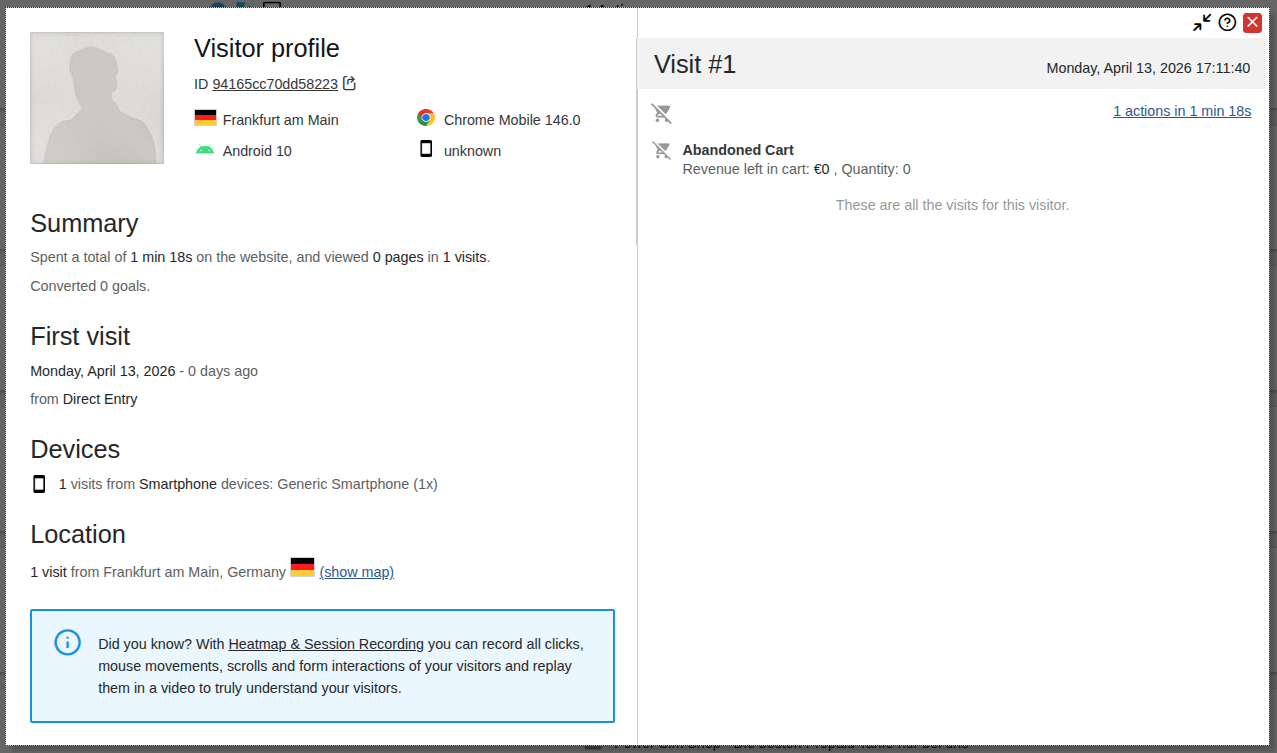
I’m currently testing Matomo for a WooCommerce site and have also purchased the “WooCommerce Analytics” extension for it. So far, everything is working, and I can see the correct sales figures in Matomo. But I can’t explain all the abandoned carts. They usually look like this example here:
These are always direct visits, without the user having viewed a specific product. I also don’t see any products that were previously in the shopping cart. The device’s resolution is also unknown.
How can these abandonment cart cases be explained?
Probably robots hitting your shopping cart page. Matomo isn’t good at recognizing and filtering out robots, especially when (as is becoming more and more common) the robots are using residential proxies and fake user-agents. So if a robot hits the shopping cart page and hits nothing else (or uses a new IP address next time), it looks like an “abandoned cart.”
You can and should make the cart page forbidden to robots in the robots.txt, but that will only stop the ones that obey robots.txt, which many don’t. Maybe you can also set up your system to only register a “cart” with Matomo when something is put into the cart; that would cut down on the “abandoned carts” in particular. But I notice similar problems with other statistics - especially robots hitting the fallback tracking “image” URLs for no-Javascript tracking - and it’s an ongoing war.
I specifically chose not to enable this no-JavaScript tracking because a shop without JavaScript doesn’t work properly anyway, and I don’t want to track bots.
Small update in case someone runs into the same thing. It wasn’t bots in my case.
It was the WooCommerce PayPal Payments plugin. To show the PayPal buttons on the product pages it runs a “cart simulation” (an ajax call to ?wc-ajax=ppc-simulate-cart) that adds the product to the cart and removes it again. The WooCommerce Analytics extension notices that cart change and logs it as a cart update, so you get a load of “abandoned carts” with no product, unknown resolution and direct as the source. It happens server side without client hints, that’s why the device info is empty.
I only found it after turning on the logging in the extension, every request was hitting ?wc-ajax=ppc-simulate-cart.
One filter fixed it (I dropped it in a small mu-plugin):
Disabling the simulation doesn’t affect the actual payments (PayPal support confirmed that), it’s mainly for the Pay Later stuff. No more fake carts since.