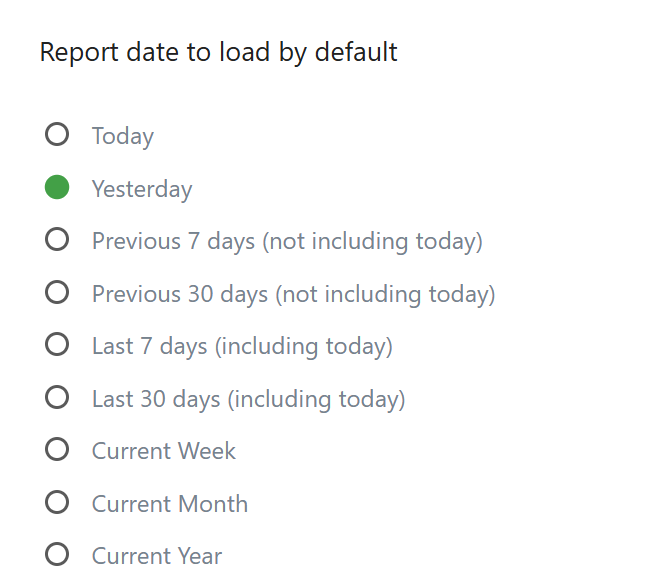
When I open ‘All websites’overview it shows standard the visits of today.
How and where can I change this that it shows the current week or month instead?
Kind regards,
When I open ‘All websites’overview it shows standard the visits of today.
How and where can I change this that it shows the current week or month instead?
Kind regards,
As far as I know, the default period in the “All websites” overview can’t be changed permanently. You need to use the date picker at the top to switch between today, this week, or this month.
It would be a useful feature if this could be saved as a default setting.
Thanks, this helped clarify the settings.
For anyone tracking usage or trends over time, setting the correct default period makes analysis much easier. I had a similar use case while reviewing consumption patterns and found that following a step-by-step approach really helps avoid confusion.
I also referred to fescoebillcheck.pk to better understand usage breakdowns and reporting logic, which made it easier to align the data with weekly and monthly trends.
Appreciate the explanation.
One thing I’ve noticed is that when you consistently review usage over fixed periods, reporting becomes much clearer.
This is especially true for services that rely on monthly billing cycles, where even small date shifts can change the perceived trend.
You cannot permanently change the default period for the All websites overview in Matomo. It always opens with Today. The only workaround is to use the date picker each time, set a preferred range in Personal settings, or bookmark the page with a date parameter like week or month.
Try this URL hash with URL query. Put it manually at the end of the URL. Save the URL, maybe as a bookmark.
#?period=week
#?period=month
examples:
current week: https://demo.matomo.cloud/index.php?module=MultiSites&action=index&idSite=1&period=day&date=today#?period=week
current month: https://demo.matomo.cloud/index.php?module=MultiSites&action=index&idSite=1&period=day&date=today#?period=month
or change the URL query value:
current week: https://demo.matomo.cloud/index.php?module=MultiSites&action=index&idSite=1&period=week&date=today
current month: https://demo.matomo.cloud/index.php?module=MultiSites&action=index&idSite=1&period=month&date=today